Try it yourself
Here, we provide guidelines for setting up the simulation environment and submitting results.
Installation guide
Installation via Docker
The simulator engine and the gym environment are incorporated into the docker image. You can pull it down to easily setup the environment.
The latest image version is 0.1.2, we will notify you if a new version is updated.
docker pull citybrainchallenge/cbengine:0.1.2
Then you can clone the code of the starter-kit.
git clone https://github.com/CityBrainChallenge/KDDCup2021-CityBrainChallenge-starter-kit.git
After pulled down the docker image and cloned the starter-kit, you can run a docker container and run the code of the starter-kit repo.
docker run -it -v /path/to/your/starter-kit:/starter-kit citybrainchallenge/cbengine:0.1.2 bash
cd starter-kit
python3 evaluate.py --input_dir agent --output_dir out --sim_cfg cfg/simulator.cfg --metric_period 200
Run simulation
To check your simulation enviroment is ok, you can run demo.py in the starter-kit, where the actions are simply fixed. You need to overwrite the function of act() in agent.py to define the policy of signal phase selection (i.e., action).
import CBEngine
import gym
import agent.gym_cfg as gym_cfg

# load config
simulator_cfg_file = './cfg/simulator.cfg'
mx_step = 360
gym_cfg_instance = gym_cfg.gym_cfg()

# gym
env = gym.make(
    'CBEngine-v0',
    simulator_cfg_file=simulator_cfg_file,
    thread_num=1,
    gym_dict=gym_cfg_instance.cfg,
    metric_period=200
)

for i in range(mx_step):
    print("{}/{}".format(i,mx_step))

    # run one step simulation
    # you can use act() in agent.py to get the actions predicted by agent.
    actions = {0: 1}
    obs, rwd, dones, info = env.step(actions)

    # print observations and infos
    for k,v in obs.items():
        print("{}:{}".format(k,v))
    for k,v in info.items():
        print("{}:{}".format(k,v))
The meaning of simulator_cfg_file, gym_cfg,``metric_period`` is explained in APIs
Here is a simple example of a fixed time (traffic signal is pre-timed) agent implemented at agent.py to coordinate the traffic signal. It use the current_step (i.e., current time step) from observation to decide the phase.
# how to import or load local files
import os
import sys
path = os.path.split(os.path.realpath(__file__))[0]
sys.path.append(path)
import gym_cfg
with open(path + "/gym_cfg.py", "r") as f:
    pass

class TestAgent():
    def __init__(self):
        self.now_phase = {}

        # pre-define time of green light
        self.green_sec = 40

        self.max_phase = 8
        self.last_change_step = {}
        self.agent_list = []ocess will run in your local environment (not the doc
        self.phase_passablelane = {}

    ################################
    # load agent list
    # not suggest to modify this function.
    # agent_list is a list of agent_id (intersection id)
    def load_agent_list(self,agent_list):
        self.agent_list = agent_list
        self.now_phase = dict.fromkeys(self.agent_list,1)
        self.last_change_step = dict.fromkeys(self.agent_list,0)
    def load_roadnet(self,intersections, roads, agents):
        self.intersections = intersections
        self.roads = roads
        self.agents = agents
    ################################


    def act(self, obs):
        """ !!! MUST BE OVERRIDED !!!
        """
        # here obs contains all of the observations and infos
        observations = obs['observations']
        info = obs['info']
        actions = {}


        # preprocess observations
        # get a dict observations_for_agent that contains the features of all agents.
        observations_for_agent = {}
        for key,val in observations.items():
            observations_agent_id = int(key.split('_')[0])
            observations_feature = key[key.find('_')+1:]
            if(observations_agenpython3 evaluate.py --input_dir agent --output_dir out --sim_cfg cfg/simulator.cfg --metric_period 200t_id not in observations_for_agent.keys()):
                observations_for_agent[observations_agent_id] = {}
            observations_for_agent[observations_agent_id][observations_feature] = val

        for agent in self.agent_list:
            # select the now_step
            # change phase for a certain period of time
            for k,v in observations_for_agent[agent].items():
                now_step = v[0]
                break
            step_diff = now_step - self.last_change_step[agent]
            if(step_diff >= self.green_sec):
                self.now_phase[agent] = self.now_phase[agent] % self.max_phase + 1
                self.last_change_step[agent] = now_step

            # construct actions
            actions[agent] = self.now_phase[agent]
        return actions
Here load_roadnet imports the roadnet file.
intersections[key_id] = {
    'have_signal': bool,
    'end_roads': list of road_id. Roads that end at this intersection. The order is random.
    'start_roads': list of road_id. Roads that start at this intersection. The order is random.
    'lanes': list, contains the lane_id in. The order is explained in Docs.
}
roads[road_id] = {
    'start_inter':int. Start intersection_id.
    'end_inter':int. End intersection_id.
    'length': float. Road length.
    'speed_limit': float. Road speed limit.
    'num_lanes': int. Number of lanes in this road.
    'inverse_road':  Road_id of inverse_road.
    'lanes': dict. roads[road_id]['lanes'][lane_id] = list of 3 int value. Contains the Steerability of lanes.
              lane_id is road_id*100 + 0/1/2... For example, if road 9 have 3 lanes, then their id are 900, 901, 902
}
agents[agent_id] = list of length 8. contains the inroad0_id, inroad1_id, inroad2_id,inroad3_id, outroad0_id, outroad1_id, outroad2_id, outroad3_id
Evaluation
evaluate.py is a scoring program that output the scores of your agent. It is the same as the evaluate program on the server. You can evaluate your solution locally by execute:
export NODE_OPTIONS=–max-old-space-size=8192
.. code-block:
python3 evaluate.py --input_dir agent --output_dir out --sim_cfg cfg/simulator.cfg --metric_period 200
Then result will be output at the starter-kit/out/scores.json. In qualification phase, your solution is evaluated every 200 seconds for scoring (i.e., metric_period=200).
Results
Results will be saved as starter-kit/out/scores.json, the data format of results is exemplified as follows.
{
  "success": true,
  "error_msg": "", // if "success" is false, "error_msg" stores the exception
  "data": {
    "total_served_vehicles": 1047, // if "success" is false, here it returns -1
    "delay_index": 2.3582080966292374 // if "success" is false, here it returns -1
  }
}
Visualization
You can visualize the replay of your intermediate results after your solution being evaluated. Here mapbox token and yarn are required. You can get a mapbox token by registering a mapbox account.
The visualization process will run in your local environment (not the docker environment). To prepare for visualization, you need to install yarn (npm is required) in your local environment.
open the /KDDCup2021-CityBrainChallenge-starter-kit folder. copy the files
lightinfo.json,roadinfo.json,time*.jsonin /log folder and paste into your newly created /ui/src/log folder. Here,
lightinfo.jsonrecords the information of traffic light.roadinfo.jsonrecords the information of road network.time*.jsonfiles record the intermediate results over all time steps, for example,time0.jsonrecords the results at the first step.
modify /ui/src/index.js
mapboxgl.accessToken = Your_Token; # your mapbox default public key
this.maxTime = max_of_time*.json # if the last file of your ``time*.json`` files is ``time359.json``, it is 359.
cd to /ui (Exit the docker environment first, then run “yarn start”)
yarn
yarn start
open localhost:3000 with your browser (If report “JavaScript heap out of memory”, please try to type “export NODE_OPTIONS=–max-old-space-size=8192” on your terminal or refer to this website)
Here are some Tips:
Sky blue indicates left-turning cars, dark blue indicates straight ahead cars, and dark green indicates right-turning cars.
Lines indicate roads. The color of the line represents the average speed of the road.
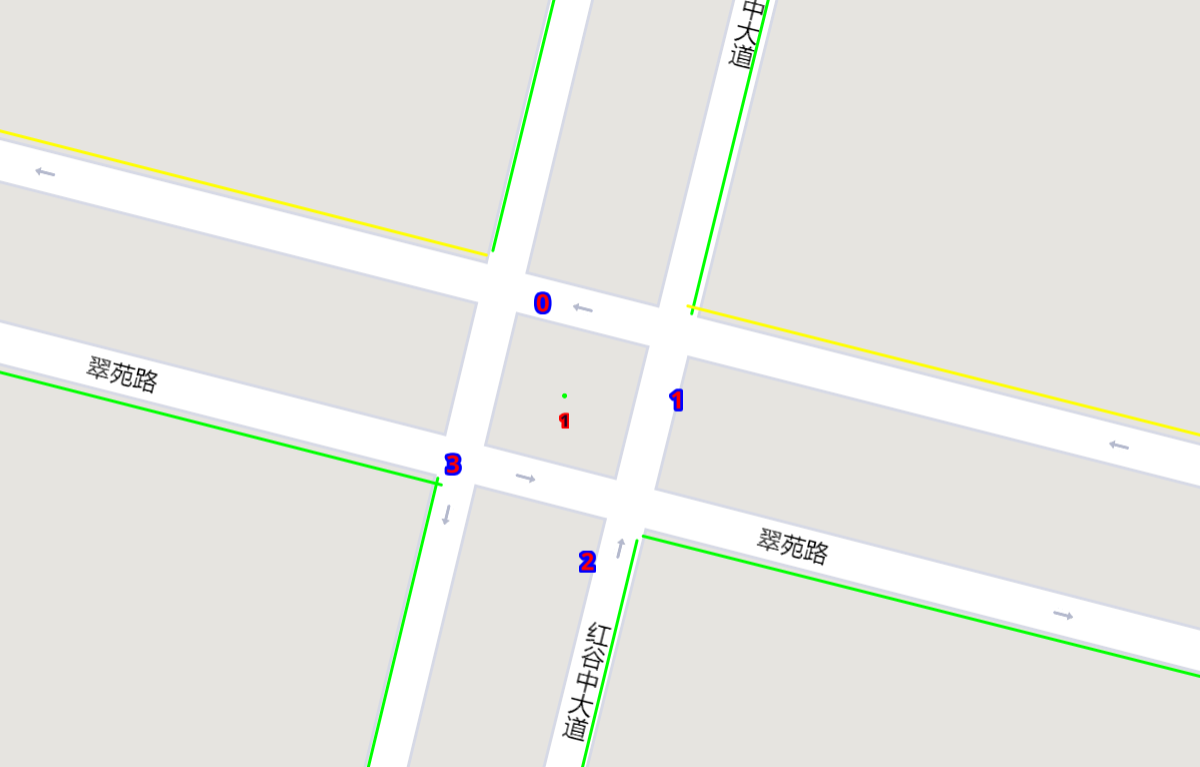
Here’s an example of an intersection in ui. The number in the center (with red background) indicates the current phase number. The number of each road segment help you to identify the permissible movements of current phase, for example, in current phase-1, 0 and 2 left-turn movements are given right-of-way. For more information about signal phase, please refer to Action.
Make a submission
To submit the models for evaluation, participants need to modify the starter-kit and place all the model-related files (including but not limited to
agent.pyand deep learning model files) into theagentfolder. Compress the agent folder and name it asagent.zipto make the submission. Note that you need to directly compress theagentfolder, rather than a group of files.Participants need to train their models offline and submit the trained models along with
agent.py, which will load them.All submissions should follow the format of our sample code in starter-kit . Hence, please do not modify any file outside the
agentfolder, except the.cfgfile (The.cfgfile can be revised to incorporate different training traffic).If your model need to import or load some files, please put them to the
agentfolder and make sure to use the absolute path. Examples are shown at the beginning of fixed timeagent.py.Please also make sure to only use the packages in the given docker file, so that your code can be executed at the evaluation platform.
Participants can report the python package required to build the model if these packages are not included in the current docker environment. The support team will evaluate the request and determine whether to add the package to the provided docker environment.
Participants are responsible for ensuring that all the submissions can be successfully tested under the given evaluation framework.