API functions
Based on the CBEngine, we provide APIs that share the similar parameters as the OpenAI Gym environment.
Simulation Initialization
env = gym.make(
        'CBEngine-v0',
        simulator_cfg_file=simulator_cfg_file,
        thread_num=1,
        gym_dict=gym_cfg_instance.cfg,
        metric_period = 200
    )
- simulator_cfg_file:
the path of simulator.cfg
be used for initialize engine
Example
#configuration for simulator

# Time Parameters
start_time_epoch = 0
max_time_epoch = 3600

# Roadnet file and flow file used to simulate
road_file_addr : ./data/roadnet_warm_up.txt
vehicle_file_addr : ./data/flow_warm_up_1000.txt


# Log configuration
# Don't change the value of report_log_mode
report_log_mode : normal
# Log path
report_log_addr : ./log/
# Log interval
report_log_rate = 10
# Log configuration to track the vehicle. Don't change the value
warning_stop_time_log = 100
- thread_num:
the thread number used for engine
- gym_dict:
the configuration used for initialize gym
a dict
The meaning of it is clarified at next section.
stored in /agent/gym_cfg.py, as a member variable of class
gym_cfg.
Example of
gym_dictgym_dict = { 'observation_features':['lane_speed','lane_vehicle_num'] }
- metric_period:
the interval of scoring
At each intervals, output a score json file
Environment Configuration: gym_cfg.py
gym_cfg.py in agent folder defines the configuration of gym environment. Currently it contains observation features. There are two options in observation features, namely lane_speed , lane_vehicle_num, which determines the content of observations you get from the env.step() api. You must write at least one of the two features.
class gym_cfg():
    def __init__(self):
        self.cfg = {
            'observation_features':['lane_speed','lane_vehicle_num']
        }
- self.cfg:
store the configuration of gym
‘observation_features’ indicates the return observation feature of the gym instance. Currently lane_speed, lane_vehicle_num are available
Simulation Step
step(actions):Simulate 10 seconds in engine.
The format of action is specified below.
return observation, reward, info, dones
The format of observations, rewards, infos and dones is specified below.
observation, reward, dones, info = env.step(action)
- actions:
Required to be a dict:
``{agent_id_1: phase_1, ... , agent_id_n: phase_n}``Set agent_id to some phase (The figure below demonstrates the allowed traffic movements in each phase)
The phase is required to be an integer in the range [1, 8] (note there is no 0)
The initial phases of all agents are set to 1
The phase of an agent will remain the same as the last phase if not specified in the dict actions
Attention: If an agent is switched to a different phase, there will be a 5 seconds period of ‘all red’ at this agent, which means all vehicles could not pass this intersection. If continuously switched to different phase, agent would be always ‘all red’.
- observations:
a dict
format:
{key_1: observations_values_1, key_2: observations_values_2}The key is “{}_{}”.format(agentid,feature) where feature is given by
gym_cfg.pyFormat of observations_values:
# observation values:

# lane_speed sample: [13, -2, -2, -2, -2, -2, -2, -2, -2, -2, -2, -2, -2, -2, -2, -2, -2, -2, -2, -2, -2, -2, -2, -2, -2]
# The first value is current second
# There are 24 lanes left. The order of their roads is defined in 'signal' part of roadnet file
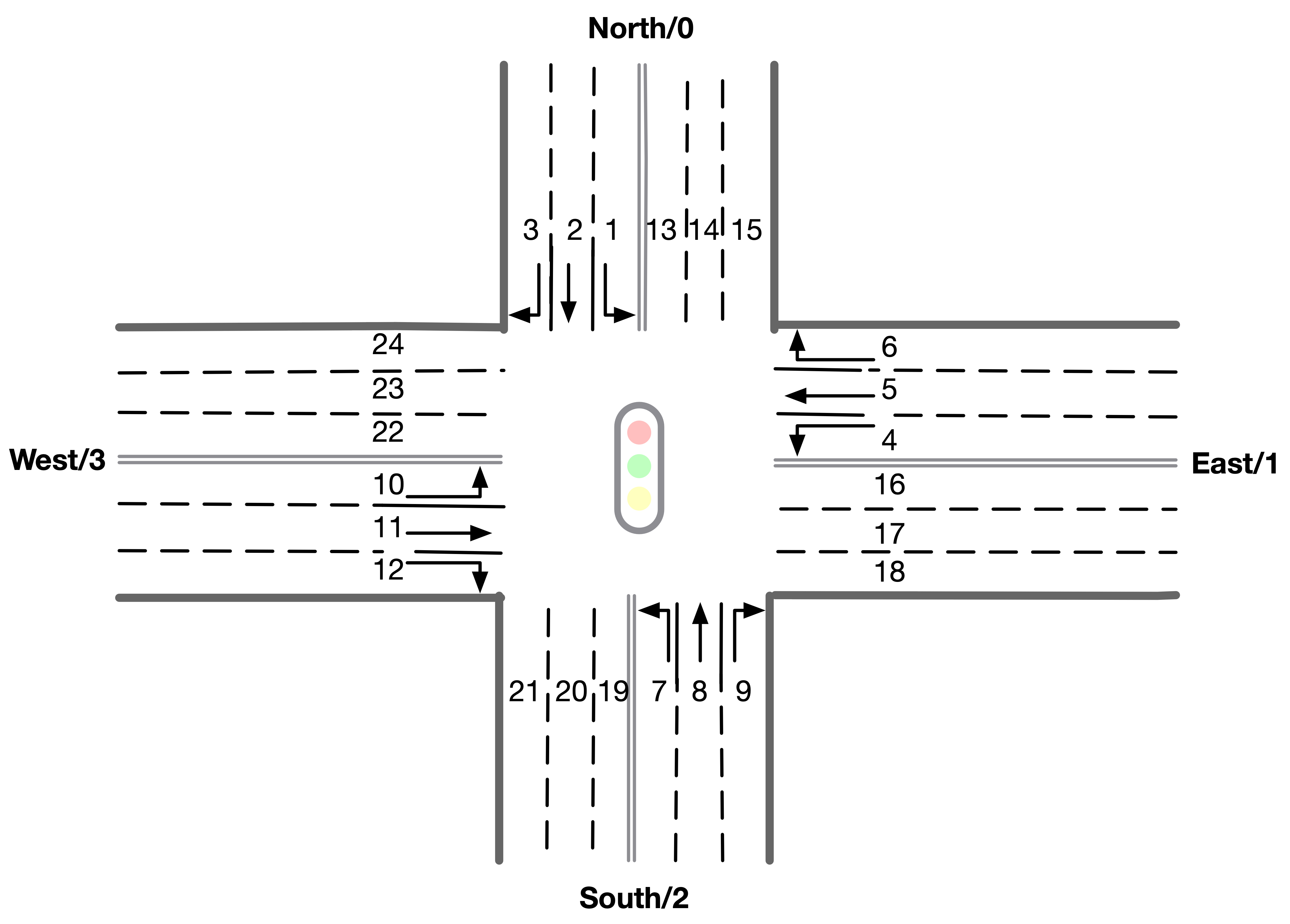
# the order is :inroad0lane0, inroad0lane1, inroad0lane2, inroad1lane0 ... inroad3lane2, outroad0lane0, outroad0lane1 ...
# Note that, [lane0, lane1, lane2] indicates the [left_turn lane, approach lane, right_turn lane] repespectively of the corresponding road.
# The order of roads are determined clockwise.
# If there is a -1 in the signal part of roadnet file (which indicates this road doesn't exist), then the returned observation of the corresponding lanes on this road are also 3 -1s.
# -2 indicating there's no vehicle on this lane

# lane_vehcile_num sample [13, 0, 0, 0, 0, 0, 0, 0, 0, 0, 0, 0, 0, 0, 0, 0, 0, 0, 0, 0, 0, 0, 0, 0, 0,]
# The first value is current second
# There are 24 lanes left. The order of their roads is defined in 'signal' part of roadnet file
# the order is :inroad0lane0, inroad0lane1, inroad0lane2, inroad1lane0 ... inroad3lane2, outroad0lane0, outroad0lane1 ...
# If there is -1 in signal part of roadnet file, then the lane of this road is filled with three -1.

# Sample Output
{
"12530758427_lane_speed": [13, -2, -2, -2, -2, -2, -2, -2, -2, -2, -2, -2, -2, -2, -2, -2, -2, -2, -2, -2, -2, -2, -2, -2, -2],
"12530758427_lane_vehicle_num" : [13, 0, 0, 0, 0, 0, 0, 0, 0, 0, 0, 0, 0, 0, 0, 0, 0, 0, 0, 0, 0, 0, 0, 0, 0,],
}
- rewards:
a dict
{agent_id_1: reward_values_1, …, agent_id_n: reward_values_n}
Format of reward_values:
# reward value:
# a list of tuples indicating (in_number of the last 10 seconds, out_number of last 10 seconds)
# The length of the value list is 24. The order of their roads is defined in 'signal' part of roadnet file and the same as in observation.
# The order is :inroad0lane0, inroad0lane1, inroad0lane2, inroad1lane0 ... inroad3lane2, outroad0lane0, outroad0lane1 ...
# If there is a -1 in the signal part of roadnet file (which indicates this road doesn't exist), then the returned observation of the corresponding lanes on this road are also 3 -1s.

# Sample Output
{
0: [(0,0),(0,1),(1,0),(0,0),(0,0),(0,1),(1,0),(0,0),(0,0),(0,1),(1,0),(0,0), (0,0),(0,1),(1,0),(0,0),(0,0),(0,1),(1,0),(0,0),(0,0),(0,1),(1,0),(0,0)]
}
Here is an illustration of the lane index in observation and reward.
- info:
a dict
{vehicle_id_1: vehicle_info_1, …, vehicle_id_m: vehicle_info_m}
env.set_info(1) to return a dictionary of vehicle information, otherwise, return an empty dictionary.
"vehicle_info": {
0: {
    "distance": [259.0], # The distance from this vehicle to the start point of current road.
    "drivable": [29301.0], # Current lane of this vehicle. Here 293 is the road segment ID, 01 indicates the middle lane (00 and 02 indicate inner and outer lanes respectively)
    "road": [293.0], # Current road of this vehicle.
    "route": [293.0, 195.0, 207.0, 5.0, 67.0, 70.0, 88.0, 92.0, 76.0, 18.0], # Route of this vehicle (starting from current road).
    "speed": [0.0], # Current speed of this vehicle.
    "start_time": [73.0], # Time of creation of this vehicle.
    "t_ff": [112.716] # Travel time of this vehicle assuming no traffic signal and other vehicle exists.
    },
...
}
- dones:
a dict
{agent_id_1: bool_value_1, …, agent_id_n: bool_value_n}
Indicating whether the simulation of an agent is ended.
Simulation Reset
reset:Reset the simulation
return a tuple: (observation, info)
reset the engine
observation , info = env.reset()
Other interface
The following interfaces of simulation environment are also provided:
set_warning(flag):env.set_warning(0): set flag as False to turn off the warning of invalid phases. The warning will be issued if a green phase to an inexistent lane.
set_log(flag):env.set_log(0): set flag as False to turn off logs for a faster speed when training. Note that the score function will not work if the logging is turned off.
set_ui(flag):env.set_ui(0): set flag as False to turn off visualization logs for a faster speed when training.
set_info(flag):env.set_info(0): set flag as False to make info that returned from env.step to be None, which can make training faster.